
Factory desktop
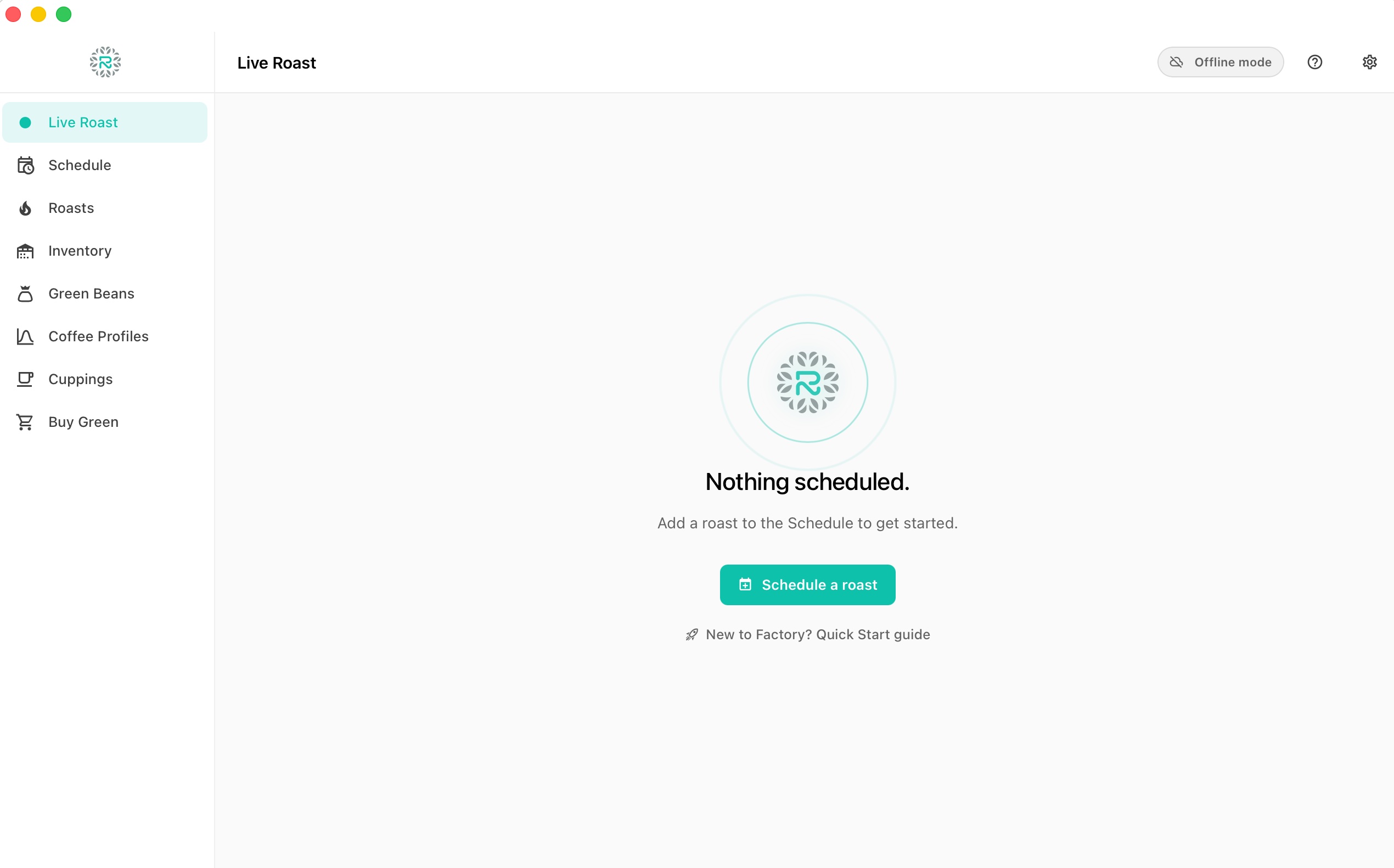
BetaThe roast log, on the device next to the machine.
Factory is the free desktop companion to Roastnet. It captures every roast live, prints the job card, and syncs back to the cloud automatically. Works offline. Runs on the device your roastery already owns.
Capture the whole roast, not just the curve.
Bean temperature, environment temperature, rate of rise, gas, fan, and drum position all flow into Factory in real time. Stage markers for charge, dry end, first crack, and drop land automatically or by the operator's hand. Every value is preserved end-to-end.
- 01Bean temp (BT) and environment temp (ET) at full sample rate.
- 02Rate of rise computed live and plotted alongside the curve.
- 03Gas, fan, and drum controls logged with timestamps.
- 04Auto-detect charge, dry end, first crack, and drop, with manual override.
One roast view. Tuned to your eyes.
No modes to switch, no dashboards to build. Factory gives you one focused production view for the whole roast. The chart is yours to tune: rate-of-rise smoothing, °C or °F, axis range, and which events sit on the curve.
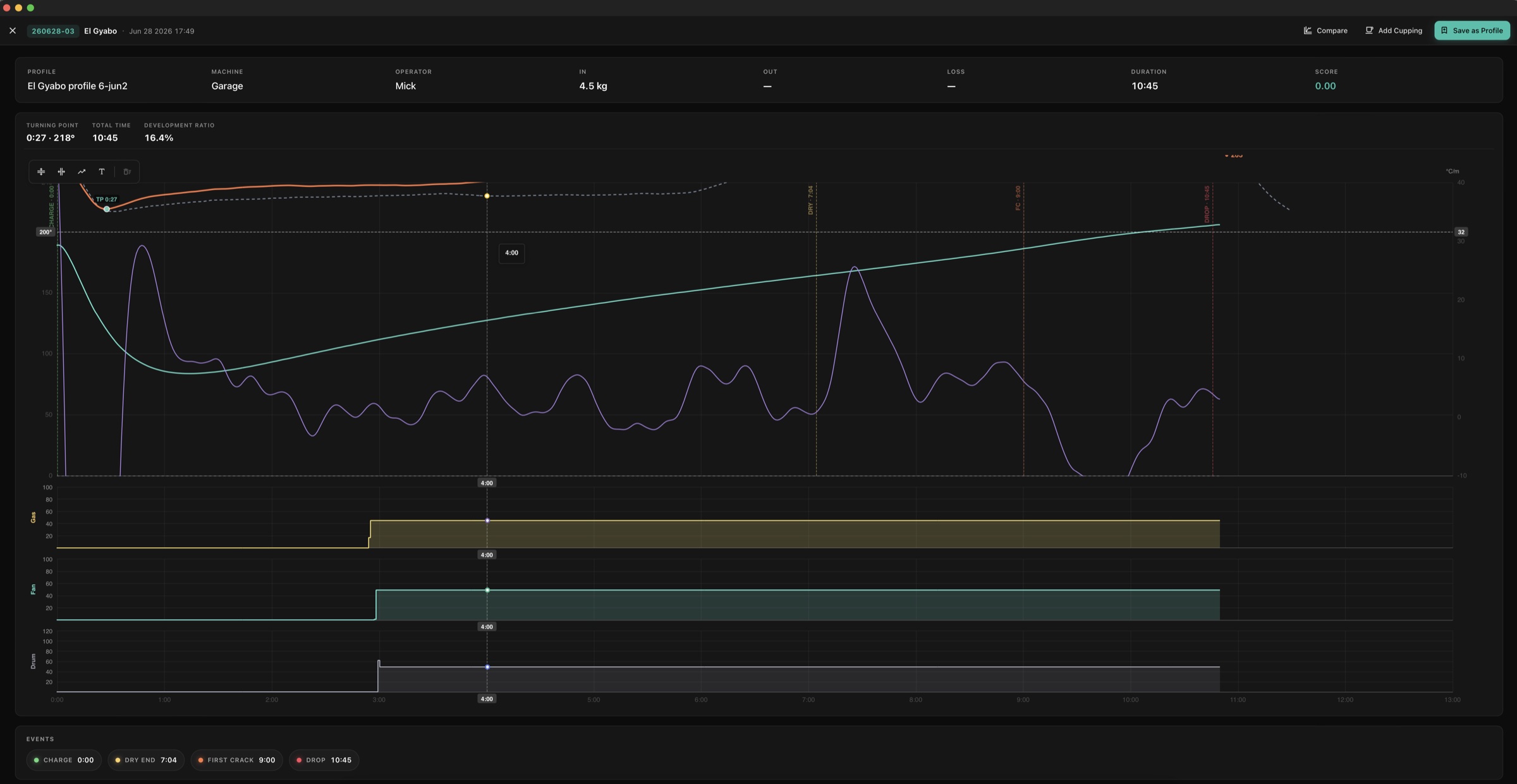
One focused view
A single production screen for the whole roast. Nothing to configure, nothing to switch between mid-batch.
Tune the chart
Rate-of-rise smoothing presets, °C or °F, axis range, and which events overlay the curve. Set it once, it sticks.
Read it across the room
High-contrast curve and large readouts, so you can act on the roast without leaning in to squint.
Speaks to the roaster's hardware.
Factory finds USB serial and MODBUS devices on start. Add the roaster brand, model, capacity, fuel type and drum speed once, and the device profile follows the operator everywhere. No reconfiguring per roast.
- 01USB serial probes and MODBUS controllers detected on launch.
- 02Roaster fleet stored once: brand, model, capacity, fuel, drum RPM.
- 03Operator roster with role, so handovers do not lose context.
- 04Temperature in C° or F° and weight in metric or imperial, per operator.
Today's roast day, on the screen, ready to weigh.
Factory pulls the day's schedule from Roastnet on launch. Each pending roast shows the green weight, the coffee, the profile, the machine, and the operator. Mark beans weighed, start the roast, and the batch is locked in. Sync runs both ways, every minute.
Loses the wifi. Keeps the roast.
Factory writes every roast to local storage. If the building drops connection mid-batch the operator does not even notice. When connectivity comes back Factory replays the missed batches into Roastnet in order. Nothing is lost.
- 01Full roast capture stored locally so a flat network is not a flat afternoon.
- 02Conflict resolution that prefers the device record for roast data.
- 03Audit timeline of every sync so a missed batch is impossible to hide.
- 04Sync indicator on the toolbar so the operator knows where they stand.
Job cards, batch labels, and printable manifests.
Print the job card before the roast starts. Choose the label size: 4″ × 6″ thermal, 4″ × 4″ thermal, Avery 2″ × 4″, Dymo 30252, or a custom layout. Optional QR code on every label routes a phone scan straight to the batch record in Roastnet.
- 01Configurable label size across thermal and laser stocks.
- 02Optional post-roast weight box for hand-write reconciliation.
- 03Optional QR code that opens the batch in Roastnet.
- 04Batch numbering: sequential, date+counter, or custom template.
Kiosk mode for hands-free roasting.
Switch Factory to full-screen kiosk view for the roast day. No menus, no chrome, no distractions. Built for the operator who is wearing gloves and watching the drum.
Free, native, and platform-respecting.
Factory runs natively on macOS and Windows, with Linux to follow. No per-roast licensing, no upgrade gates on critical features. The desktop app is part of the platform you already pay for.
AI in Factory
Smart cues, smarter every quarter.
Factory uses on-device heuristics for stage detection today and a small Roastnet-trained model is on the way for crack detection and Phase 6+ smart cues. Everything runs next to the roaster, with cloud-side training only when you opt in.
- 01Auto-detect charge, dry end, first crack, and drop with configurable sensitivity.
- 02Smart cues highlight unusual rate-of-rise patterns mid-roast.
- 03Future: vision crack detection trained on Roastnet curves with your opt-in.
- 04Future: per-coffee profile recommendations from your cupping history.
Learn Factory
Tutorials, from install to weigh-out.
Step-by-step guides with real screenshots: set up your roaster and team, add green coffee, plan the day, weigh in, log the live roast, weigh out, print the job card, cup the result and keep Factory in step with Roastnet.
- Install Roastnet Factory and open it for the first timeFactory is a free desktop app that runs on the computer next to your roaster. Installation takes a couple of minutes on a Mac or Windows PC. On first launch, you choose whether to connect to Roastnet or work offline.6 min read
- Connect Factory to your Roastnet workspace, or run it offlineFactory works on its own, but pairing it with a Roastnet workspace brings the day's schedule to the screen next to the roaster, sends every roast to the cloud and keeps stock accurate across the team.7 min read
- Set up your roaster, hardware connection and team in FactoryThe schedule needs a machine and an operator, and the live curve needs a probe. Three panes in Preferences cover these: Machines, Team and Hardware.8 min read
- Add green coffee to Factory: the bean catalogue and receiving stockFactory keeps two lists that beginners often confuse: Green Beans is the catalogue of coffees you buy; Inventory is the bags you actually hold. Add the coffee first, then receive the bags against it, so every roast deducts from the right lot.7 min read
- Create a coffee profile in Factory and roast to itA coffee profile is a roast you want to repeat, saved with its curve, timings and targets. Factory builds one from a real batch in two clicks, then draws it as a ghost line in the cockpit so the next roast can follow it.6 min read
- Plan the roast day in the Factory ScheduleThe Schedule is the day's worklist: every batch you intend to roast, in order, with its weight, machine and operator. Build it from the green you hold. It then guides the weighing, roasting and weigh-out that follow.8 min read
- Weigh in: confirm the charge weight and start a batchAt weigh-in, Factory records the actual green weight for each batch, warns when it differs from the schedule, and uses that weight, rather than the planned weight, to calculate roast loss later.6 min read
- Log a live roast in Factory: the curve, rate of rise, gas, fan, drum and markersThe cockpit is one screen for the whole roast: live curves on the left, numbers and faders on the right, and four stage buttons along the bottom. This is where you log a batch from charge to drop.9 min read
- Weigh out: record the roasted weight and roast lossDrop is not the end of the batch. The roasted weight turns a logged roast into roasted stock and gives you the number that tells you whether this batch matched the last: roast loss.6 min read
- Print the job card, bucket labels and batch cards from FactoryA job card in the bucket is the cheapest traceability a roastery can buy. Factory prints one per batch, sized to your label stock, with a QR code that opens the batch in Roastnet. After the roast, it prints a batch card for the roasted beans.6 min read
- Record a cupping in Factory and score the roastA roast curve tells you what you did. A cupping tells you whether it worked. Factory attaches a scored cupping to its batch, so the best-tasting roast of a coffee is recorded alongside its curve.6 min read
- Review roast history and compare curves in FactoryRoasts is the archive of every finished batch, with its recorded curve, events and weights. Open a roast to replay it, compare it with the profile and the last few batches on the same machine, and decide what to change next time.7 min read
- Buy green coffee from Factory, and list spare lots for saleBuy Green puts the live green coffee market on the screen next to the roaster. Browse listings from importers and other roasters, order a lot, and it arrives in your inventory and catalogue without double entry. The same screen lets you sell coffee you will not roast.6 min read
- Keep Factory and Roastnet in step: sync, offline work and backupsFactory writes everything to the device first, then sends it to Roastnet. That is why a dropped connection never costs a roast. This tutorial explains the queue behind the pending pill, the audit log and the backups pane that protects work that has not synced yet.7 min read
Put Factory on the device next to the roaster.
Pair it with a free Roastnet trial and capture your first batch this afternoon.